Why birthdays started slipping
Facebook made birthdays effortless in a way that's easy to forget. Everyone you knew had entered their own birthday, it reminded you in the morning, and the whole thing cost you nothing. That only works if your friends are still on Facebook and still look at it. Many aren't. According to the Pew Research Center, 71% of U.S. teens used Facebook in 2014-15. By 2024, it was 32%. Among adults, plenty still have an account they rarely open, and a birthday reminder you never see isn't a reminder.
The obvious replacement is your phone, and that's where most people get stuck. Phone contacts have a birthday field, but almost nobody fills it in. So the real problem isn't reminders. Every phone can do reminders. It's that the birthdays themselves were living in Facebook, not with you.
Step 1: Get the birthdays in one place
This is the one-time chore that makes everything else work. Start with your closest friends and family, since those are the birthdays that hurt most to miss, and work outward.
- Check what you already have. Old birthday cards, past "happy birthday!" messages in your chats, and photos from birthday dinners all carry dates. Search your messages for "happy birthday" and you'll find a surprising number.
- Ask. It feels awkward for about three seconds. "I'm putting everyone's birthdays in my phone so I stop missing them, when's yours?" is a nice message to receive. In a group chat, ask once and collect everyone's at the same time.
- Note the year if you know it. It's not essential, but knowing someone is turning 40 rather than 39 changes what you send.
- Put them all in one place. A few in your contacts, a few on a calendar, and a few in your head is how birthdays get missed. Pick one home for them.
Step 2: Choose where your birthdays live
There's no single right answer, but the options differ more than you'd think.
| Option | Good at | Falls short on |
|---|---|---|
| Zero setup, since friends enter their own birthdays | Only covers friends who are on it and shared their birthday, and only works if you open it | |
| iPhone Contacts and Calendar | Built in. Birthdays from Contacts show up in Calendar automatically, with alerts up to a week before | You enter everything yourself, and the reminder is just a date, with nothing about the person |
| Google Contacts and Calendar | Built in on Android. Reminders on the day or up to two weeks before, for birthdays and other significant dates | Same as iPhone: manual entry, and a bare reminder with no context |
| A spreadsheet or notes app | Easy to see the whole list at once | Doesn't remind you of anything, so it only works if you remember to check it |
| A friendship journal app | Birthdays live with everything else you know about the person, like what's going on in their life and when you last saw them | Another app to set up, and you still enter birthdays yourself |
If all you want is a ping on the day, your phone's built-in contacts and calendar are enough. If you want to know what to say when the ping comes, keep birthdays somewhere that also knows something about the person. That's what a friendship journal is for.
Step 3: Set two reminders, not one
A reminder at 9 a.m. on the day is enough for a text. It's not enough to send a card, order a gift, or organize dinner. That's why the most useful setup is two reminders:
- About a week before, for anything that needs planning: a card that has to arrive, a gift, booking a table, or finding a time for a call across time zones.
- On the day, for the message itself.
On iPhone: add the birthday to the person's card in Contacts. Then go to Settings, Calendar, Default Alert Times, Birthdays, and choose when you want to be reminded: on the day (at 9 a.m.), one day before, two days before, or one week before. If birthday alerts never show up, check that Upcoming Events notifications are turned on for Calendar.
On Android: add the birthday to the contact in Google Contacts, and make sure the Birthdays calendar is turned on in Google Calendar. In the Google Contacts app, you can add a notification to a birthday or another significant date, on the day or up to two weeks before.
If you'd rather not juggle two separate alerts, a weekly look at who has a birthday in the next few weeks does the same job as the early reminder.
Step 4: Make the message count
Remembering the date is the minimum. What makes a birthday message land is showing you remember the person. Compare "Happy birthday!! 🎉" with "Happy birthday! Hope the new flat is feeling like home. Are you celebrating on Saturday?"
The second one takes ten more seconds, but only if you know about the new flat. This is where the details you remember about a friend pay off: what they're in the middle of, who they live with, what they were excited about the last time you talked. How to remember details about your friends covers a simple way to keep track of them.
Birthdays are also the easiest excuse there is to reconnect with a friend you've drifted from. You don't need a reason to message, because the date gives you one. And if you're worried it'll be strange after a long silence, the research says otherwise. In a series of experiments published in 2023, Peggy Liu and colleagues found people consistently underestimate how much others appreciate hearing from them out of the blue, especially when the message is more of a surprise. A birthday message to an old friend is exactly that kind of surprise.
Don't stop at birthdays
Once you have a system, it's worth adding a few more dates. Birthdays are the dates everyone expects you to remember. The ones nobody expects are often the ones that mean more: a wedding anniversary, a friend's first day at a new job, a due date, or the anniversary of losing someone. A message on one of those days stands out precisely because almost nobody else sends one. Google Contacts calls these "significant dates." A friendship journal usually has a place for them too.
How BuddyLog handles birthdays
In BuddyLog, a birthday is part of each person's profile, next to your notes, the people in their life, and when you last saw them. You get a notification on the day, and every birthday shows up in the Calendar tab next to your plans, so you can see a busy week coming. You can turn birthday notifications off for individual people. Birthdays and birthday notifications are free, on both iPhone and Android.
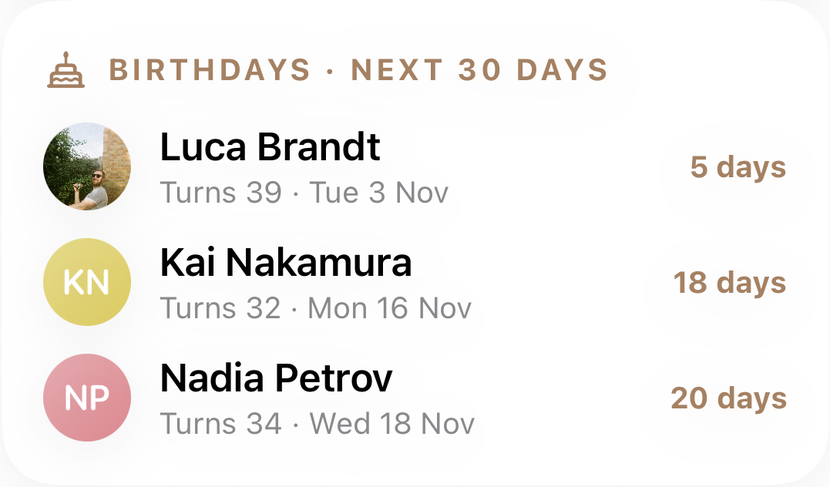
Coming in BuddyLog 2.0, the Home screen gets a Birthdays card that shows everyone with a birthday in the next 30 days: how old they're turning, the date, and how many days you have left. It's the "week before" reminder without setting one up, and it leaves time to order the gift or plan the dinner.
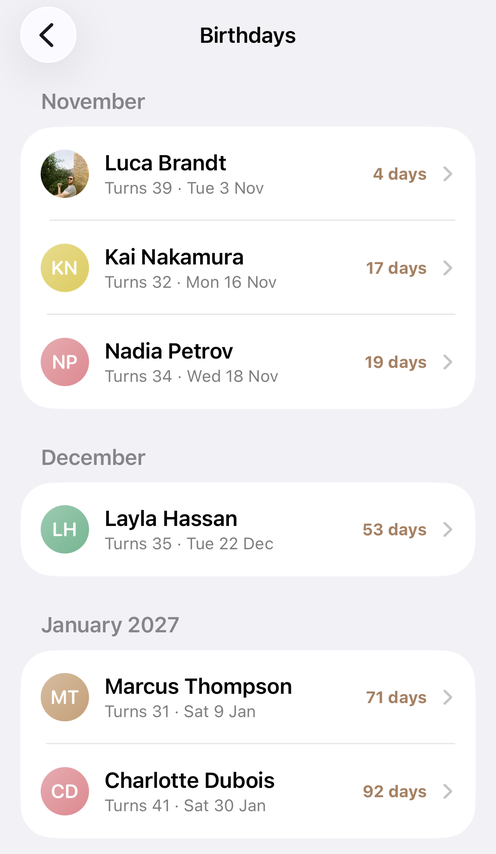
Tap the card and you get the full year: every birthday you've saved, grouped by month, with the same countdown. It's the easiest way to see a busy month coming, or to check whose birthday you'll be away for before you book a trip.
For the dates beyond birthdays, Anniversaries let you save the yearly milestones in a friendship, and they show up in the Calendar tab alongside birthdays. Everything stays on your device (with optional iCloud sync on iPhone), with no account, no ads, and nobody else seeing your list.
The quick version
- Collect: search your messages for "happy birthday," check old cards, and ask anyone you're missing.
- Centralize: put every birthday in one place you'll keep using, not split across apps.
- Remind twice: about a week before for plans and gifts, and on the day for the message.
- Personalize: mention one thing that's going on in their life.
- Reconnect: use birthdays as a reason to message the friends you've drifted from.
Quick answer: To remember friends' birthdays without Facebook, collect them into one place you control, such as your phone's contacts (iPhone Contacts or Google Contacts) or a friendship journal app, by checking old messages and cards and asking friends directly. Then set two reminders: about a week before, to leave time for a card, gift, or plan, and on the day, for the message. iPhone lets you set birthday alerts up to a week before in Settings, Calendar, Default Alert Times. Google Contacts allows reminders up to two weeks before. A short personal detail in the message makes it land better than a generic "happy birthday."
FAQ
How do I remember my friends' birthdays without Facebook?
Collect them in one place you control, like your phone's contacts or a friendship journal app, then set a reminder about a week before and another on the day. Most of the work is the first step: gathering the dates once.
How do I get birthday reminders on my iPhone?
Add the birthday to the person's card in Contacts, and it appears in Calendar's Birthdays calendar. Choose when you're alerted in Settings, Calendar, Default Alert Times, Birthdays: on the day, one or two days before, or a week before.
How do I get birthday reminders on Android?
Add the birthday in Google Contacts, and it appears in Google Calendar's Birthdays calendar. In the Google Contacts app, you can add a notification on the day or up to two weeks before.
Is it okay to send a belated birthday message?
Yes. A late message beats no message, and research shows people underestimate how much others appreciate hearing from them unexpectedly. Keep the apology short and make the message about them.
